Introduction
When you work on a large feature in a single chat session, the context grows quickly. In my experience, somewhere past 100k tokens, most models get worse at remembering earlier agreements and make more mistakes. This is called context rot.
An agent does better when the context for each iteration is small, decisions have already been made and written down, and the state of the work lives outside the agent — in an issue tracker or local files. Below is my outline for taking a feature from idea to pull request.
This approach is for large features that need to be discussed and broken down into tasks first. For a simple bugfix, typo, or small refactor, there’s no point running the full cycle — you can usually just give the agent the task.
Workflow
My workflow is largely based on the approach of Matt Pocock and his set of skills: the sequence of steps from idea to final PR is already baked in, and I lean on it as is.
To install the skills, follow Matt’s instructions.
I’ll walk through each step using a small side project, geo-quiz, as an example. I use Claude Code and GitHub. You can follow the same steps with another AI agent, such as OpenCode, and keep tasks in local files instead of GitHub issues.
I don’t always use the full workflow. I often run individual skills manually — that gives me more control over what the agent does. If something breaks, it’s easier to debug a specific step.
Example feature
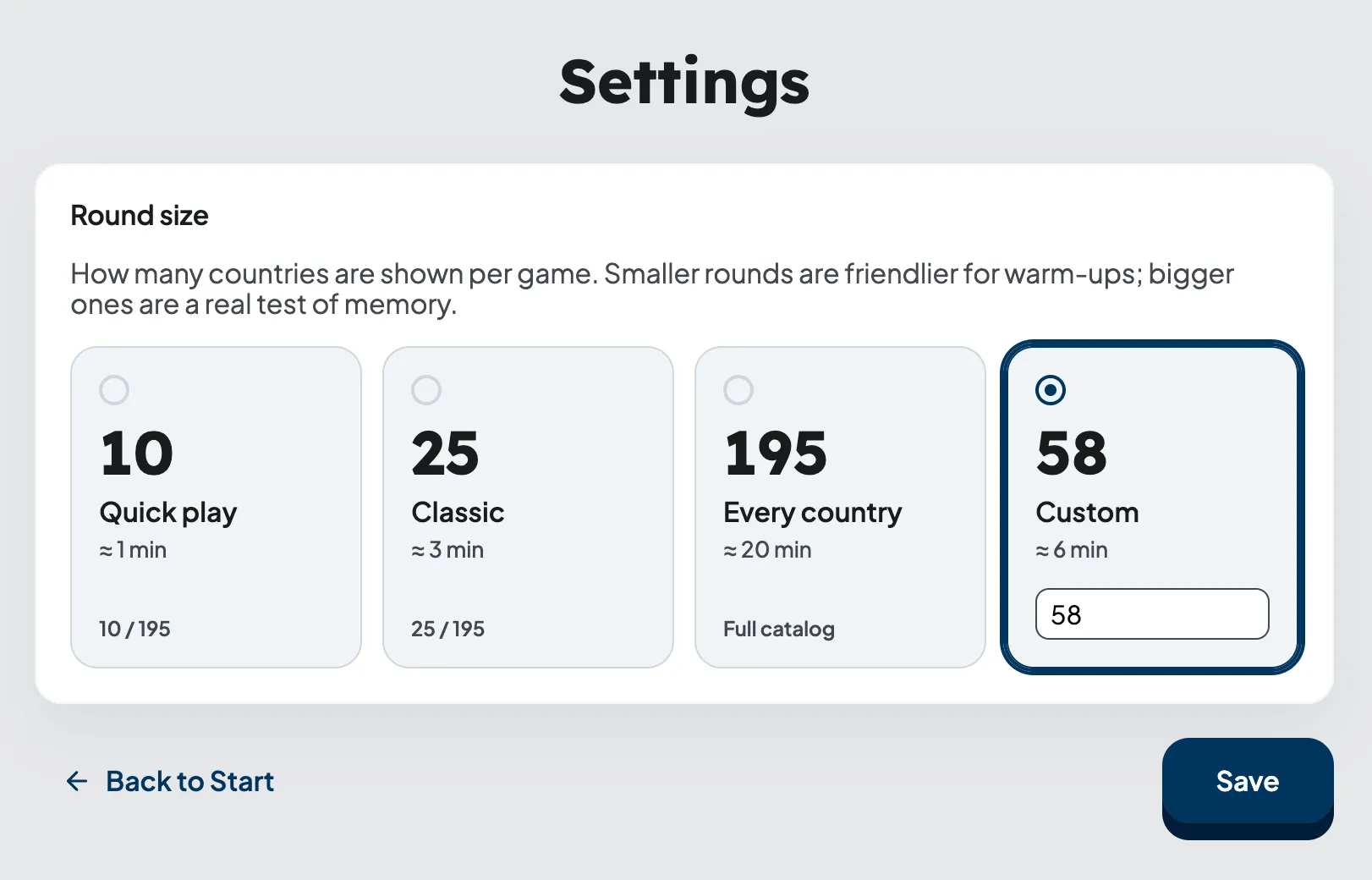
In a small flag quiz game, we need to add a settings screen (/settings): the player sets the number of questions per round — presets (10, 25, all countries in the catalog) or a custom number; the choice is saved in localStorage and applied when the next round starts.
Capturing requirements
At this stage Matt Pocock has two related skills:
/grill-me— the agent asks detailed questions about the feature and helps clarify the requirements./grill-with-docs— the same interview, but with the project’s existing domain model in mind. Along the way, the agent clarifies terms and records them inCONTEXT.md. When needed, it documents architectural decisions in ADRs (Architectural Decision Records).
When I start working on a new feature, I use /grill-with-docs. Historically /grill-me came first — a skill that became viral on its own. But over time Matt noticed that he regularly lacked a shared language with the agent (in DDD this is ubiquitous language, UL): grilling sessions surfaced recurring terms, but they weren’t recorded anywhere, and next time he had to articulate them again. First he ran a second skill /ubiquitous-language in parallel, which extracted terms into a separate glossary, and then he merged the two into one — that’s how /grill-with-docs was born.
In geo-quiz, I describe my idea to the agent and invoke /grill-with-docs. The agent then asks for details and records each important decision. It also updates CONTEXT.md at the repository root.
CONTEXT.md is the project glossary, with definitions of key terms. DDD has a concept called ubiquitous language — a shared language for developers and domain experts. The same terms are used in the code. The glossary helps everyone agree on what each concept means and use those definitions consistently in their work.
The agent can check CONTEXT.md to find out what a “round” or a “preset” means in the project. These definitions help it use the established terminology when writing code and PR descriptions.
The same term can mean different things in different parts of a project. In DDD, the area where a particular model and its language apply is called a bounded context. For projects like this, Matt uses separate CONTEXT.md files. A CONTEXT-MAP.md file at the root shows which contexts exist in the project and where to find their glossaries.
/
├── CONTEXT-MAP.md
├── docs/adr/                # system-wide decisions
└── src/
    ├── ordering/
    │   ├── CONTEXT.md
    │   └── docs/adr/        # decisions inside the context
    └── billing/
        ├── CONTEXT.md
        └── docs/adr/
If terms have the same meaning throughout the project, a single CONTEXT.md at the root is enough. When individual contexts need their own glossaries, CONTEXT-MAP.md helps the agent and the developer find the right one.
Besides CONTEXT.md, /grill-with-docs sometimes suggests creating an ADR — a separate markdown file in docs/adr/ explaining an architectural decision. An ADR records why a decision was made and what trade-offs were accepted. This is especially useful when a decision is hard to reverse and looks strange without context.
In my experience, AI can fill CONTEXT.md with plausible-looking slop. So this stage puts a lot of responsibility on the developer. This slop isn’t always easy to spot during code review, especially if the reviewer isn’t familiar with the domain.
Creating a PRD
Once the glossary has settled and the debatable decisions are captured in ADRs, the idea is ready to be translated into a formal document — a PRD (Product Requirements Document).
A PRD is a short document describing one feature: goal, use cases, scope (what’s in and what’s not in), acceptance criteria. Unlike CONTEXT.md, which describes the domain language as a whole, a PRD is always tied to one specific feature.
A PRD is created with the /to-prd skill — this skill takes the chat context and creates a PRD from a template, then publishes it on GitHub. An example of such a PRD: issue #13 — Configured round size (settings page).
The document itself isn’t stored in the repository — it only lives as a GitHub issue. After creating the PRD I skim the resulting artifact. Matt in his video says that he doesn’t do this: shared context with the agent, in his words, has already been reached at the /grill-with-docs stage, and the PRD here is needed more as a fixation point than as something to be agreed upon.
Slicing into tasks
The /to-issues skill splits a large PRD into small tasks. Each of these tasks:
- Is self-contained — you can take it, implement it, and merge it.
- Is a vertical slice (tracer bullet) — a small, complete piece of functionality: for example, saving a setting, including the UI, logic, and tests. You can try it out right away. With a horizontal slice, a task covers one technical layer — for example, the entire backend for a feature. You can only test the user flow once the remaining layers are implemented, so vertical slices are a better fit for agent tasks.
- Is marked as AFK (can be handed to an agent) or HITL (requires a human — for example, a design decision or an architectural choice).
The agent shows the proposed split, gets feedback, iterates, and then publishes child issues on GitHub with the ready-for-agent label — by this label the ralph loop later picks them up (see below).
All issues belonging to one PRD are tagged with labels:
prd— this label is only put on the PRD issue itself.prd-<N>, where<N>is the number of the PRD issue. This label is put on both the PRD itself and all its child issues.
This scheme is needed so that later one query can find all child issues belonging to a PRD.
An example of one such “child”: issue #14 — Configured round size: Quiz preferences store and round-start resolution.
After this step, in GitHub I have: one PRD issue with several child issues attached to it, all with the right labels.
ralph loop
ralph loop is a very simple loop:
while not done:
    agent_step()
The name was coined by Geoffrey Huntley — it’s a reference to Ralph Wiggum from The Simpsons. The character is a little dim, but he keeps trying and doesn’t get discouraged by failure. The loop behaves the same way — the same prompt, different code around it, and so on until the task is closed.

For this I have a script .agents/ralph/loop.sh: it calls the agent in a loop with the same PROMPT.md and looks at the last line of output — STATUS=done, STATUS=progress, or STATUS=blocked. Based on the status it decides whether to exit or call the agent again. PROMPT.md itself describes what to do in a single pass.
Under the hood the script takes a PRD issue number, changes to the repo root, and in a loop up to MAX_ITERS (20 by default) runs the agent with the same PROMPT.md. The output of each iteration is written to .agents/ralph/logs/<timestamp>/iter-NN.log — from there the script greps the last STATUS=… line and decides whether to continue.
The agent invocation itself:
claude \
  --allowed-tools=Bash,Read,Edit,Write,MultiEdit,Grep,Glob \
  -p "$PROMPT_BODY"
The -p flag (a.k.a. --print) puts Claude Code in headless mode: the agent prints its response to stdout and exits, without the interactive TUI:
~ ❯ claude -p "Hello, claude"
Hello! How can I help you today?
~ ❯
Without it, calling from a script wouldn’t make sense — the TUI would block the pipeline.
If you use OpenCode instead of Claude Code, change this line to opencode run "$PROMPT_BODY" — it has the same non-interactive mode that doesn’t wait for input and auto-approves tools by itself. The rest of the wrapping (logs, STATUS parsing, the loop) stays as is.
Next to loop.sh lies loop-once.sh — almost the same script, but without the outer loop and without -p. Without -p the agent runs in the normal interactive TUI: I can see how it reasons, which tools it calls, where it stumbles. This is a mode for observation and tuning. In practice I use it more often than the full loop.sh — that’s the “parts instead of the whole” from the caveat at the beginning.
A crucial detail: between iterations ralph remembers nothing. It takes exactly one child issue and implements it. On the next step everything starts from scratch, with an empty context: the agent re-reads GitHub, sees which issues are already closed, which are blocked, and decides for itself which one to take next.
I keep state in GitHub: open/closed issues, labels, open/merged PRs. This is the single source of truth. If ralph crashes mid-work, you can just restart it, and it’ll figure out which step to continue from on its own.
You don’t have to use GitHub as the state store. Just as well you can keep tasks in a local tasks/ directory with markdown files where the status is given in frontmatter, and have the agent scan that folder instead of gh issue list. The key idea — state should be preserved outside the agent’s memory, in durable storage that survives a restart.
Inside each iteration ralph uses my skill implement-issue.
This skill:
- Cross-references
CONTEXT.mdand ADRs — so that names in code/commits/PR match the domain. - Creates a branch
ralph/<n>-<slug>off the PRD epic branch (prd/<N>-<slug>), not offmain. - Implements the issue via TDD — this is a separate skill
tdd. A vertical slice is used: one test → minimal implementation → next test. Acceptance criteria from the issue body become the list of tests. - Runs lint, prettier, build, vitest locally.
- Opens a PR into the epic branch with
Closes #<n>. - Hands the PR to the
loop-on-ciskill, which watches PR checks viagh pr checks, fixes CI failures, and squash-merges into the epic branch.
All child PRs are merged into the epic branch prd/<N>-<slug>. ralph never does the final merge into main — that’s my responsibility.
Final PR into main
When ralph closes the last child of a PRD, in GitHub I have one big epic PR prd/<N>-<slug> → main, consisting of a clean series of squash commits “one commit per issue.”
An example of a PR into the epic branch: PR #18 — Configured round size: Settings page and home navigation.
Next:
- I go through the functionality with my eyes and hands in the browser.
- I read the diff as a whole: I care how the feature looks as a single piece.
- With the agent’s help I fix places where it cut a corner or took a wrong turn.
- After QA — I merge the epic into
main. GitHub automatically closes all child issues byCloses #<n>and the PRD itself.
In short
The full path from idea to a merge into main:
/grill-with-docs— the agent clarifies the feature requirements and records term definitions inCONTEXT.md. When needed, it documents architectural decisions in ADRs./to-prd— collects the chat context into a PRD and publishes it as a GitHub issue with theprdlabel./to-issues— slices the PRD into child vertical-slice issues and applies routing labels (prd-<N>,ready-for-agent).- ralph loop — takes a
ready-for-agentissue, viaimplement-issuedrives it to a PR into the epic branch;loop-on-cifixes CI and squash-merges. - Final merge — I go through the epic PR by hand in the browser, read the diff as a whole, make targeted edits, and merge into
main.
By the time ralph picks up a task, the main requirements have already been defined and written down. It’s easier for the agent to understand what needs to be done, although the result still needs to be checked and corrected. Of everything I’ve tried, this approach works best.